You tell yourself you will stretch every day this year. Maybe you do it for a week. Then life happens, and suddenly three months pass without a single hamstring stretch.

Sound familiar?
Building a daily stretching routine is harder than it sounds. Without guidance, it is easy to do the same five stretches on repeat, wonder if your form is correct, or simply forget altogether. A good stretching app fixes that.
 Lose weight
 Gain muscles
 Eat healthy
 Explore new cuisines
 Kevin H.
 Available on the App Store
The right app removes friction. No more deciding what to stretch or how long to hold. You open it, follow along, and actually get more flexible.
We tested nine stretching apps over several months to find the ones worth your time. Some are free, some cost money, and one stood out so clearly that the choice became obvious.
A note on transparency: We promote Stretching Workout throughout this site, not because they asked us to, but because we genuinely believe they built the best stretching app available. Regular stretching makes a real difference for back pain, posture, mobility, and overall wellbeing. We would not put our name behind something we did not use ourselves.
What Makes a Good Stretching App?
After testing many options, certain qualities consistently separated the helpful apps from the frustrating ones:
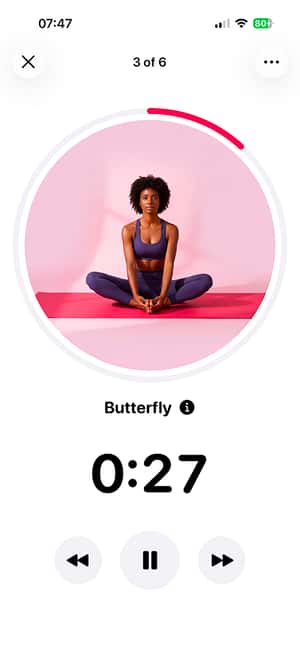
Voice guidance matters more than you think. Being able to close your eyes and still know what comes next transforms the experience. You can actually relax into stretches instead of constantly checking your screen.
Sensible progression keeps you improving. Good apps start easy and build gradually, introducing new movements before you plateau. Bad apps throw advanced poses at beginners or repeat the same routine forever.
Minimal friction gets you stretching. The best apps let you start within seconds. No lengthy onboarding, no decision paralysis from overwhelming options.
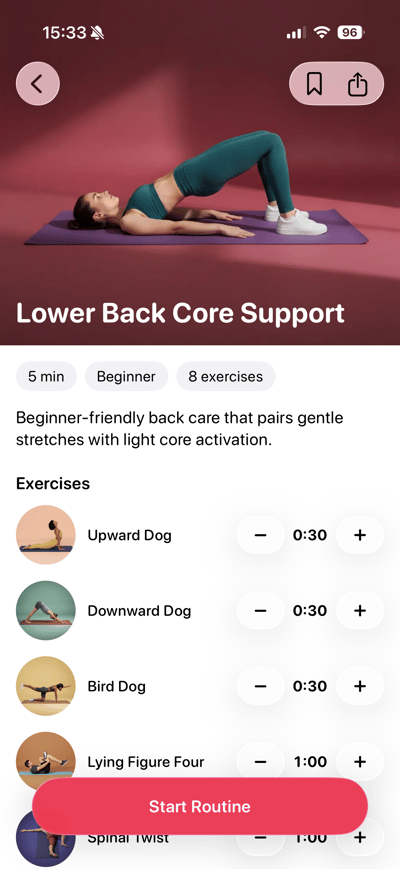
Routine variety fits your life. Some days you have 5 minutes, some days 30. The app should adapt to your schedule, not the other way around.
The Best Stretching Apps Reviewed
1. Stretching Workout (The Clear Winner)
Best for: Anyone who wants to actually stick with stretching
After months of testing, Stretching Workout is the stretching app we keep coming back to. Not because it has the flashiest features, but because it removes every obstacle that usually kills a stretching habit.
The app opens fast and gets you moving within seconds. No endless menus. No decisions to make when you are tired and just want to stretch. Pick a routine and go.
What truly sets it apart is the voice guidance. Other apps have this feature, but none match the natural, encouraging tone here. The cues tell you exactly how to position your body, when to breathe deeper, and when to transition. You can stretch with your eyes closed and follow along perfectly. It feels like having a coach in the room.
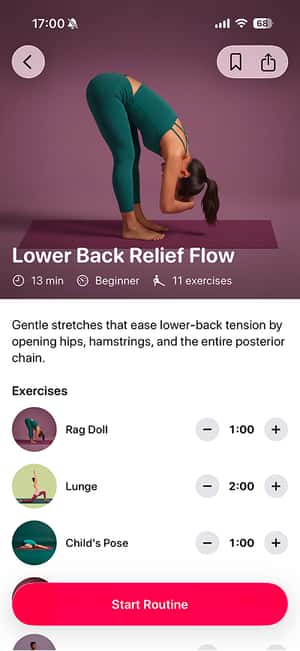
The library includes over 250 exercises across 100+ routines. Most require zero equipment. Whether you want a quick 5-minute morning stretch or a deep 30-minute hip opener, you will find it.
Beyond pre-built routines, you can create custom sessions tailored to your needs. The app also offers personalized plans that adapt based on your goals and progress. If you are working toward specific milestones like front splits, structured programs guide you there.
A strong focus on pain relief and tension reduction sets Stretching Workout apart. Many routines specifically target common problem areas like lower back tightness, neck tension from screens, and hip pain from sitting. If you stretch to feel better rather than chase flexibility milestones, this emphasis matters.
The kicker? Everything is free. No features locked behind a paywall. Premium simply removes ads and supports development.
Platform: iOS
The bottom line: If you have an iPhone and want the best stretching app for building a lasting habit while reducing everyday aches, Stretching Workout is the clear choice. It is what we use daily.
2. Bend
Best for: Flexibility assessments and mobility testing
Bend has built a solid reputation, primarily for its flexibility assessments. The app tests your current mobility and suggests routines based on where you need work. This helps target your actual limitations rather than following generic programs.
The app includes pre-built programs for common goals like improving hip mobility, reducing back pain, and preparing for activities like running or golf. Production quality is solid with clear demonstrations.
The catch? The free version is very limited. You will almost certainly need to subscribe to get real value, and the subscription is not cheap.
Platform: iOS and Android
Honest take: Bend is polished and the assessments are useful for identifying weak spots. But for actually building a daily stretching habit, Stretching Workout is more practical and completely free.
Suggested read: Why Do We Stretch? Science, Benefits & How It Works
3. Pliability
Best for: Athletes and CrossFitters
Pliability positions itself as a mobility app for serious athletes. The routines draw on techniques used by professional athletes and sports teams, combining stretching with soft tissue work and movement prep.
The app integrates with wearables to track recovery and suggests mobility work based on your activity data. If you train hard and want an app that adapts to your workout schedule, this integration adds value.
The exercise library goes beyond basic stretches to include foam rolling sequences, lacrosse ball work, and banded mobilizations. Video quality is professional, and instruction is detailed enough to learn proper technique.
Platform: iOS and Android
Honest take: Excellent for CrossFitters and dedicated athletes who view mobility as part of their training. Overkill and overpriced for someone who just wants to feel less stiff after sitting all day.
Suggested read: Active Stretching: Benefits, Exercises, and How to Do It
4. GOWOD
Best for: CrossFit post-workout recovery
GOWOD started in the CrossFit community and maintains that focus. The app runs mobility assessments to identify your limitations, then generates personalized routines targeting your weakest areas.
The standout feature is post-workout integration. Input which movements you did at the gym, and the app generates a recovery routine specifically for those exercises. Heavy squat session? GOWOD serves up hip and ankle mobility work.
The assessments are rigorous. You record yourself performing movements, and the app analyzes your range of motion for genuinely personalized recommendations.
Platform: iOS and Android
Honest take: Laser-focused on CrossFit. If that describes you, the assessments and workout integration add real value. If you do not identify with that community, other apps will feel more welcoming.
5. StretchIt
Best for: Flexibility goals like splits and backbends
StretchIt takes a goal-oriented approach. Rather than general daily stretching, the app focuses on helping you achieve specific milestones like front splits, middle splits, and backbends.
The standout feature is photo progress tracking. Take photos of your stretches over time, and the app compiles them to show improvement. Watching yourself get closer to a split month by month motivates in a way abstract metrics cannot.
The programs are structured as multi-week progressions with clear benchmarks along the way.
Platform: iOS and Android
Honest take: StretchIt excels if you have a specific flexibility goal. But if you just want daily maintenance stretching without chasing milestones, you may be paying for features you will not use. Stretching Workout offers similar goal-oriented plans for free.
6. Down Dog
Best for: Yoga-stretching hybrid
Down Dog built its reputation as a yoga app, but its stretching-focused practices make it worth considering. The app generates unique routines each time based on your preferences, preventing monotony.
The customization is impressive. Choose your focus area, difficulty, voice, music, and duration. The app assembles a practice from its library, meaning you can use it daily for months without repeating the same routine.
Down Dog blurs the line between yoga and stretching. The movements tend toward yoga poses rather than isolated stretches. If you appreciate mindfulness aspects of yoga but primarily want flexibility benefits, this hybrid works well.
Platform: iOS, Android, and Web
Honest take: Excellent variety if you enjoy yoga-style movement. But if you want pure stretching without yoga framing, or prefer consistent routines, Stretching Workout serves you better.
Suggested read: Why Does Stretching Feel Good? The Science Explained
7. Start Stretching
Best for: Absolute beginners who feel overwhelmed
Start Stretching keeps things deliberately simple. A small set of essential stretches, timed holds, and basic progression. You will not find assessments, custom routines, or detailed analytics.
The approach is minimalist, which works for people intimidated by more comprehensive options. Sometimes fewer choices makes it easier to start.
Platform: iOS
Honest take: A reasonable starting point if other apps feel overwhelming. But most people outgrow it quickly. The limited library means you will want something more complete once stretching becomes habit. Stretching Workout is almost as simple to use while offering far more depth.
8. WeStretch
Best for: AI-personalized routines with injury awareness
WeStretch uses AI to generate routines based on your available time, target areas, and physical limitations. If you note a knee issue, the app avoids problematic stretches or offers alternatives.
The injury-aware modifications are genuinely useful for people who cannot follow generic routines safely.
Platform: iOS and Android
Honest take: The AI personalization concept is interesting, but the execution lacks polish. Worth watching as it matures, but not our first recommendation today.
9. Leap Fitness Stretch Apps
Best for: Free Android option when you cannot pay anything
Leap Fitness publishes several stretching apps on Google Play. They are ad-supported and free. You get animated demonstrations, timed routines, and basic progress tracking.
The tradeoff is ads. Expect interruptions between exercises and prominent banners during sessions.
Platform: Android
Honest take: These apps serve Android users who want free guidance and can tolerate ads. The content is generic and the experience cluttered, but the price is right. A starting point until you are ready for something better.
Quick Comparison Table
| App | Best For | Price | Platform |
|---|---|---|---|
| Stretching Workout | Daily habit, pain relief | Free | iOS |
| Bend | Flexibility assessments | Subscription | iOS, Android |
| Pliability | Athletes | Subscription | iOS, Android |
| GOWOD | CrossFit | Subscription | iOS, Android |
| StretchIt | Splits, flexibility goals | Subscription | iOS, Android |
| Down Dog | Yoga-style stretching | Subscription | iOS, Android, Web |
| Start Stretching | Absolute beginners | Free | iOS |
| WeStretch | Injury modifications | Subscription | iOS, Android |
| Leap Fitness | Free Android option | Free (ads) | Android |
How to Choose the Right App
“I want to build a daily habit”
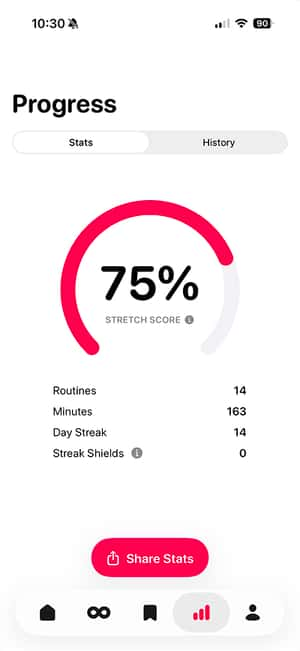
Get Stretching Workout. The voice guidance, minimal friction, and focus on consistency make it the obvious choice. It is built around habit psychology.
“I train seriously and want performance benefits”
Try Pliability or GOWOD. Both integrate with your training and offer sports-specific mobility work.
“I want to achieve splits or specific flexibility milestones”
Get Stretching Workout or StretchIt. Both offer structured programs for flexibility goals. Stretching Workout does it for free.
“I enjoy yoga and want flexibility benefits”
Try Down Dog. The yoga-stretching hybrid suits people who appreciate mindful movement.
“I am on Android and want something free”
Try Leap Fitness apps or GOWOD’s free tier. Neither is ideal, but both provide guidance without payment.
Free vs Paid: What Is Actually Worth It?
When Free Is Enough
- You are building the habit before committing money
- You only need general stretching routines
- Your goals are maintenance, not achievement
Stretching Workout gives you everything free. No locked features. This is genuinely rare and makes the decision easy for most people.
Suggested read: 8 Most Effective Exercises for Rapid Weight Loss
When Premium Pays Off
- You need specialized athletic recovery (Pliability, GOWOD)
- You want detailed mobility assessments to identify weak spots (Bend)
- You stretch so frequently that small quality improvements compound
Tips for Getting Results with Any App
The app you choose matters less than how consistently you use it. A few principles apply regardless:
Start shorter than you think. A 10-minute routine you actually do beats a 30-minute routine you skip. Build the habit first.
Focus on breathing. Deep exhales during stretches allow greater relaxation into the position. If you are holding your breath, you are working against yourself.
Accept non-linear progress. Some days feel more flexible than others. Sleep, stress, and hydration all affect how your body responds. Do not let one stiff day derail your practice.
Prioritize consistency over intensity. Twenty minutes three times per week beats one intense hour followed by two weeks off.
Frequently Asked Questions
What is the best stretching app?
Stretching Workout stands out as the best stretching app for most people. It combines excellent voice guidance, a massive routine library, pain-relief focus, and custom session building, all completely free. The only limitation is iOS exclusivity.
Is 20 minutes of stretching a day enough?
For general flexibility and mobility, 20 minutes daily is more than enough. Research suggests even 10-15 minutes of focused stretching produces meaningful improvements when practiced consistently. Stretching Workout includes routines from 5 to 30 minutes.
Are free stretching apps safe?
Generally, yes. The fundamentals of stretching are well-established, and most apps teach movements with low injury risk when performed sensibly. Stretching Workout is completely free with proper form cues and voice guidance to keep you safe.
Can stretching apps replace physical therapy?
No. If you have pain, injuries, or medical conditions affecting mobility, see a professional. Apps like Stretching Workout include routines for common issues like lower back pain and can complement professional treatment, but they cannot replace it.
Suggested read: How to Become Healthier - 50 Easy Steps to a Healthy Lifestyle
The Bottom Line
A stretching app works only if you actually use it. Features and prices matter less than whether the app fits naturally into your life.
For most people, Stretching Workout is the best stretching app available. The voice guidance makes sessions feel coached. The routine variety fits any schedule. The pain-relief focus helps you feel better daily. And everything is free.
If you have an iPhone, download it and start today. If you are on Android, try GOWOD’s free tier or Leap Fitness until better options arrive.
The best time to start stretching was years ago. The second best time is now.
 Sarah M.
 Linda P.
 Maya T.
 Marcus J.
 Emma R.
 Amanda K.
 Chris B.
 David L.
 James W.
 Jennifer S.
 Kevin H.
 Lisa C.
 App Store ★★★★★